Bases
This page features the bases of MidiTok, of how tokenizers work.
Tokens and vocabulary
A token is a distinct element, part of a sequence of tokens. In natural language, a token can be a character, a subword or a word. A sentence can then be tokenized into a sequence of tokens representing the words and punctuation. For symbolic music, tokens can represent the values of the note attributes (pitch, valocity, duration) or time events. These are the “basic” tokens, that can be compared to the characters in natural language. With Byte Pair Encoding (BPE), tokens can represent successions of these basic tokens. A token can take three forms, which we name by convention:
Token (
string): the form describing it, e.g. Pitch_50.Id (
int): an unique associated integer, used as an index.Byte (
string): an unique associated byte, used internally for Byte Pair Encoding (BPE).
MidiTok works with TokSequence objects to output token sequences of represented by these three forms.
Vocabulary
The vocabulary of a tokenizer acts as a lookup table, linking tokens (string / byte) to their ids (integer). The vocabulary is an attribute of the tokenizer and can be accessed with tokenizer.vocab. The vocabulary is a Python dictionary binding tokens (keys) to their ids (values).
For tokenizations with embedding pooling (e.g. CPWord or Octuple), tokenizer.vocab will be a list of Vocabulary objects, and the tokenizer.is_multi_vocab property will be True.
With Byte Pair Encoding:
tokenizer.vocab holds all the basic tokens describing the note and time attributes of music. By analogy with text, these tokens can be seen as unique characters.
After training a tokenizer with Byte Pair Encoding (BPE), a new vocabulary is built with newly created tokens from pairs of basic tokens. This vocabulary can be accessed with tokenizer.vocab_bpe, and binds tokens as bytes (string) to their associated ids (int). This is the vocabulary of the 🤗tokenizers BPE model.
TokSequence
The methods of MidiTok use miditok.TokSequence objects as input and outputs. A miditok.TokSequence holds tokens as the three forms described in Byte Pair Encoding (BPE). TokSequences are subscriptable and implement __len__ (you can run tok_seq[id] and len(tok_seq)).
You can use the miditok.MIDITokenizer.complete_sequence() method to automatically fill the non-initialized attributes of a miditok.TokSequence.
- class miditok.TokSequence(tokens: list[str | list[str]] = None, ids: list[int | list[int]] = None, bytes: str = None, events: list[Event | list[Event]] = None, ids_bpe_encoded: bool = False, _ids_no_bpe: list[int | list[int]] = None)
Sequence of token.
A
TokSequencecan represent tokens by their several forms: * tokens (list of str): tokens as sequence of strings; * ids (list of int), these are the one to be fed to models; * events (list of Event): Event objects that can carry time or other information useful for debugging; * bytes (str): ids are converted into unique bytes, all joined together in a single string. This is used by MidiTok internally for BPE.Bytes are used internally by MidiTok for Byte Pair Encoding. The
ids_are_bpe_encodedattribute tells ifidsis encoded with BPE.
MIDI Tokenizer
MidiTok features several MIDI tokenizations, all inheriting from the miditok.MIDITokenizer class.
You can customize your tokenizer by creating it with a custom Tokenizer config.
- class miditok.MIDITokenizer(tokenizer_config: TokenizerConfig = None, params: str | Path | None = None)
MIDI tokenizer base class, acting as a common framework.
This is the base class of all tokenizers, containing the common methods and attributes. It serves as a framework, and implement most of the tokenization global workflow. Child classes should only implement specific methods, for their specific behaviors, leaving most of the logic here.
- Parameters:
tokenizer_config – the tokenizer’s configuration, as a
miditok.TokenizerConfigobject.params – path to a tokenizer config file. This will override other arguments and load the tokenizer based on the config file. This is particularly useful if the tokenizer learned Byte Pair Encoding. (default: None)
- add_to_vocab(token: str | Event, vocab_idx: int | None = None, byte_: str | None = None, add_to_bpe_model: bool = False) None
Add an event to the vocabulary. Its id will be the length of the vocab.
- Parameters:
token – token to add, as a formatted string of the form “Type_Value”, e.g. Pitch_80, or an Event.
vocab_idx – idx of the vocabulary (in case of embedding pooling). (default:
None)byte – unique byte associated to the token. This is used when building the vocabulary with fast BPE. If None is given, it will default to
chr(id_ + CHR_ID_START). (default:None)add_to_bpe_model – the token will be added to the bpe_model vocabulary too. (default:
None)
- apply_bpe(seq: TokSequence | list[TokSequence]) None
Apply Byte Pair Encoding (BPE) to a TokSequence, or list of TokSequences.
If a list is given, BPE will be applied by batch on all sequences at the time.
- Parameters:
seq – Sequence(s) to apply BPE.
- complete_sequence(seq: TokSequence) None
Complete (inplace) a
miditok.TokSequence.The input sequence can have some of its attributes (
ids,tokens) not initialized (i.e.None). This method will initialize them from the present ones. Thebytesattribute will be created if the tokenizer has been trained with BPE. Theeventsattribute will not be filled as it is only intended for debug purpose.- Parameters:
seq – input
miditok.TokSequence, must have at least one attribute defined.
- decode_bpe(seq: TokSequence | list[TokSequence]) None
Decode (inplace) the BPE of the ids of a
miditok.TokSequence.This method only modifies the
.idsattribute of the input sequence(s) only and does not complete it. This method can be used recursively on lists ofmiditok.TokSequence.- Parameters:
seq – token sequence to decompose.
- has_midi_time_signatures_not_in_vocab(midi: ScoreFactory()) bool
Check if a MIDI contains time signatures not supported by the tokenizer.
- Parameters:
midi – MIDI file
- Returns:
boolean indicating whether the MIDI can be processed by the tokenizer.
- property io_format: tuple[str, ...]
Return the i/o format of the tokenizer.
The characters for each dimension returned are: *
I: track or instrument; *T: token, or time step; *C: class of token, when using embedding pooling.- Returns:
i/o format of the tokenizer, as a tuple of strings which represent:
- property is_multi_voc: bool
Indicate if the tokenizer uses embedding pooling / have multiple vocabularies.
- Returns:
Trueis the tokenizer uses embedding pooling elseFalse.
- learn_bpe(vocab_size: int, iterator: Iterable | None = None, files_paths: list[Path | str] | None = None, start_from_empty_voc: bool = False, **kwargs) None
Construct the vocabulary from BPE backed by the 🤗tokenizers library.
The data used for training can either be given through the
iteratorargument as an iterable object yielding strings, or byfiles_pathsas a list of paths to MIDI files that will be tokenized. You can read the Hugging Face 🤗tokenizers documentation, 🤗tokenizers API documentation and 🤗tokenizers course for more details about theiteratorand input type.The training progress bar will not appear with non-proper terminals. (cf GitHub issue )
- Parameters:
vocab_size – size of the vocabulary to learn / build.
iterator – an iterable object yielding the training data, as lists of string. It can be a list or a Generator. This iterator will be passed to the BPE model for training. It musts implement the
__len__method. If None is given, you must use thetokens_pathsargument. (default: None)files_paths – paths of the files to load and use. They can be either MIDI or tokens (json) files. (default: None)
start_from_empty_voc – the training will start from an empty base vocabulary. The tokenizer will then have a base vocabulary only based on the unique bytes present in the training data. If you set this argument to True, you should use the tokenizer only with the training data, as new data might contain “unknown” tokens missing from the vocabulary. Comparing this to text, setting this argument to True would create a tokenizer that will only know the characters present in the training data, and would not be compatible/know other characters. This argument can allow to optimize the vocabulary size. If you are unsure about this, leave it to False. (default: False)
kwargs – any additional argument to pass to the trainer. See the tokenizers docs for more details.
- property len: int | list[int]
Return the length of the vocabulary.
If the tokenizer uses embedding pooling/have multiple vocabularies, it will return the list of their lengths. Use the
miditok.MIDITokenizer.__len__()magic method (len(tokenizer)) to get the sum of the lengths.- Returns:
length of the vocabulary.
- static load_tokens(path: str | Path) dict[str, list[int]]
Load tokens saved as JSON files.
- Parameters:
path – path of the file to load.
- Returns:
the tokens, with the associated information saved with.
- midi_to_tokens(midi: ScoreFactory(), apply_bpe: bool = True) TokSequence | list[TokSequence]
Tokenize a MIDI file.
This method returns a (list of)
miditok.TokSequence.If you are implementing your own tokenization by subclassing this class, override the protected
_midi_to_tokensmethod.- Parameters:
midi – the MIDI object to convert.
apply_bpe – will apply BPE if the tokenizer’s vocabulary was trained with. (default:
True)
- Returns:
a
miditok.TokSequenceiftokenizer.one_token_streamisTrue, else a list ofmiditok.TokSequenceobjects.
- preprocess_midi(midi: ScoreFactory())
Pre-process a MIDI file to resample its time and events values.
This method is called before parsing a MIDI’s contents for tokenization. Its notes attributes (times, pitches, velocities) will be downsampled and sorted, duplicated notes removed, as well as tempos. Empty tracks (with no note) will be removed from the MIDI object. Notes with pitches outside
self.config.pitch_rangewill be deleted.- Parameters:
midi – MIDI object to preprocess.
- save_params(out_path: str | Path, additional_attributes: dict | None = None, filename: str | None = 'tokenizer.json') None
Save tokenizer in a Json file.
This can be useful to keep track of how a dataset has been tokenized.
- Parameters:
out_path – output path to save the file. This can be either a path to a file (with a name and extension), or a path to a directory in which case the
filenameargument will be used.additional_attributes – any additional information to store in the config file. It can be used to override the default attributes saved in the parent method. (default:
None)filename – name of the file to save, to be used in case
out_pathleads to a directory. (default:"tokenizer.json")
- save_tokens(tokens: TokSequence | list[int] | ndarray, path: str | Path, programs: list[tuple[int, bool]] | None = None, **kwargs) None
Save tokens as a JSON file.
In order to reduce disk space usage, only the ids are saved. Use
kwargsto save any additional information within the JSON file.- Parameters:
tokens – tokens, as list, numpy array, torch or tensorflow Tensor.
path – path of the file to save.
programs – (optional), programs of the associated tokens, should be given as a tuples (int, bool) for (program, is_drum).
kwargs – any additional information to save within the JSON file.
- property special_tokens: list[str]
Return the special tokens in the vocabulary.
- Returns:
special tokens of the tokenizer
- property special_tokens_ids: Sequence[int]
Return the ids of the special tokens in the vocabulary.
- Returns:
ids of the special tokens of the tokenizer
- token_id_type(id_: int, vocab_id: int | None = None) str
Return the type of the given token id.
- Parameters:
id – token id to get the type.
vocab_id – index of the vocabulary associated to the token, if applicable. (default:
None)
- Returns:
the type of the token, as a string
- token_ids_of_type(token_type: str, vocab_id: int | None = None) list[int]
Return the list of token ids of the given type.
- Parameters:
token_type – token type to get the associated token ids.
vocab_id – index of the vocabulary associated to the token, if applicable. (default:
None)
- Returns:
list of token ids.
- tokenize_midi_dataset(midi_paths: str | Path | Sequence[str | Path], out_dir: str | Path, overwrite_mode: bool = True, validation_fn: Callable[[ScoreFactory()], bool] | None = None, save_programs: bool | None = None, verbose: bool = True) None
Tokenize a dataset or list of MIDI files and save them in Json files.
The resulting json files will have an
idsentry containing the token ids. The format of the ids will correspond to the format of the tokenizer (tokenizer.io_format). Note that the file tree of the source files, up to the deepest common root directory if midi_paths is given as a list of paths, will be reproducing inout_dir. The config of the tokenizer will be saved as a file namedtokenizer_config_file_name(default:tokenizer.json) in theout_dirdirectory.- Parameters:
midi_paths – paths of the MIDI files. It can also be a path to a directory, in which case this method will recursively find the MIDI files within (.mid, .midi extensions).
out_dir – output directory to save the converted files.
overwrite_mode – if True, will overwrite files if they already exist when trying to save the new ones created by the method. This is enabled by default, as it is good practice to use dedicated directories for each tokenized dataset. If False, if a file already exist, the new one will be saved in the same directory, with the same name with a number appended at the end. Both token files and tokenizer config are concerned. (default:
True)validation_fn – a function checking if the MIDI is valid on your requirements (e.g. time signature, minimum/maximum length, instruments…). (default:
None)save_programs – will save the programs of the tracks of the MIDI as an entry in the Json file. That this option is probably unnecessary when using a multitrack tokenizer (config.use_programs), as the program information is present within the tokens, and that the tracks having the same programs are likely to have been merged. (default:
Falseifconfig.use_programs, elseTrue)verbose – will throw warnings of errors when loading MIDI files, or if some MIDI content is incorrect or need your attention. (default:
True)
- tokens_errors(tokens: TokSequence | list[TokSequence] | list[int | list[int]] | ndarray) float | list[float]
Return the ratio of errors of prediction in a sequence of tokens.
Check if a sequence of tokens is made of good token types successions and returns the error ratio (lower is better).
- Parameters:
tokens – sequence of tokens to check.
- Returns:
the error ratio (lower is better).
- tokens_to_midi(tokens: TokSequence | list[TokSequence] | list[int | list[int]] | ndarray, programs: list[tuple[int, bool]] | None = None, output_path: str | None = None)
Detokenize one or multiple sequences of tokens into a MIDI file.
You can give the tokens sequences either as
miditok.TokSequenceobjects, lists of integers, numpy arrays or PyTorch/Jax/Tensorflow tensors. The MIDI’s time division will be the same as the tokenizer’s:tokenizer.time_division.- Parameters:
tokens – tokens to convert. Can be either a list of
miditok.TokSequence, a Tensor (PyTorch and Tensorflow are supported), a numpy array or a Python list of ints. The first dimension represents tracks, unless the tokenizer handle tracks altogether as a single token sequence (tokenizer.one_token_stream == True).programs – programs of the tracks. If none is given, will default to piano, program 0. (default:
None)output_path – path to save the file. (default:
None)
- Returns:
the midi object (
symusic.Score).
- property vocab: dict[str, int] | list[dict[str, int]]
Get the base vocabulary, as a dictionary mapping tokens (str) to their ids.
The different (hidden / protected) vocabulary attributes of the class are: *
._vocab_base: Dict[str: int] token -> id - Registers all known base tokens; *.__vocab_base_inv: Dict[int: str] id -> token - Inverse of._base_vocab, to go the other way; *._vocab_base_id_to_byte: Dict[int: str] id -> byte - Link ids to their associated unique bytes; *._vocab_base_byte_to_token: Dict[str: str] - similar as above but for tokens; *._vocab_bpe_bytes_to_tokens: Dict[str: List[str]] byte(s) -> token(s) used to decode BPE; *._bpe_model.get_vocab(): Dict[str: int] byte -> id - bpe model vocabulary, based on unique bytes.Before training the tokenizer with BPE, bytes are obtained by running
chr(id). After training, if we did start from an empty vocabulary, some base tokens might be removed from._vocab_base, if they were never found in the training samples. The base vocabulary being changed,chr(id)would then bind to incorrect bytes (on which byte succession would not have been learned). We register the original id/token/byte association in._vocab_base_id_to_byteand._vocab_base_byte_to_token.- Returns:
the base vocabulary.
- property vocab_bpe: None | dict[str, int]
Return the vocabulary learnt with BPE.
In case the tokenizer has not been trained with BPE, it returns None.
- Returns:
the BPE model’s vocabulary.
Tokenizer config
All tokenizers are initialized with common parameters, that are hold in a miditok.TokenizerConfig object, documented below. You can access a tokenizer’s configuration with tokenizer.config.
Some tokenizers might take additional specific arguments / parameters when creating them.
- class miditok.TokenizerConfig(pitch_range: tuple[int, int] = (21, 109), beat_res: dict[tuple[int, int], int] = {(0, 4): 8, (4, 12): 4}, num_velocities: int = 32, special_tokens: Sequence[str] = ['PAD', 'BOS', 'EOS', 'MASK'], use_chords: bool = False, use_rests: bool = False, use_tempos: bool = False, use_time_signatures: bool = False, use_sustain_pedals: bool = False, use_pitch_bends: bool = False, use_programs: bool = False, use_pitch_intervals: bool = False, beat_res_rest: dict[tuple[int, int], int] = {(0, 1): 8, (1, 2): 4, (2, 12): 2}, chord_maps: dict[str, tuple] = {'7aug': (0, 4, 8, 11), '7dim': (0, 3, 6, 9), '7dom': (0, 4, 7, 10), '7halfdim': (0, 3, 6, 10), '7maj': (0, 4, 7, 11), '7min': (0, 3, 7, 10), '9maj': (0, 4, 7, 10, 14), '9min': (0, 4, 7, 10, 13), 'aug': (0, 4, 8), 'dim': (0, 3, 6), 'maj': (0, 4, 7), 'min': (0, 3, 7), 'sus2': (0, 2, 7), 'sus4': (0, 5, 7)}, chord_tokens_with_root_note: bool = False, chord_unknown: tuple[int, int] = None, num_tempos: int = 32, tempo_range: tuple[int, int] = (40, 250), log_tempos: bool = False, remove_duplicated_notes: bool = False, delete_equal_successive_tempo_changes: bool = False, time_signature_range: dict[int, list[int] | tuple[int, int]] = {4: [5, 6, 3, 2, 1, 4], 8: [3, 12, 6]}, sustain_pedal_duration: bool = False, pitch_bend_range: tuple[int, int, int] = (-8192, 8191, 32), delete_equal_successive_time_sig_changes: bool = False, programs: Sequence[int] = [-1, 0, 1, 2, 3, 4, 5, 6, 7, 8, 9, 10, 11, 12, 13, 14, 15, 16, 17, 18, 19, 20, 21, 22, 23, 24, 25, 26, 27, 28, 29, 30, 31, 32, 33, 34, 35, 36, 37, 38, 39, 40, 41, 42, 43, 44, 45, 46, 47, 48, 49, 50, 51, 52, 53, 54, 55, 56, 57, 58, 59, 60, 61, 62, 63, 64, 65, 66, 67, 68, 69, 70, 71, 72, 73, 74, 75, 76, 77, 78, 79, 80, 81, 82, 83, 84, 85, 86, 87, 88, 89, 90, 91, 92, 93, 94, 95, 96, 97, 98, 99, 100, 101, 102, 103, 104, 105, 106, 107, 108, 109, 110, 111, 112, 113, 114, 115, 116, 117, 118, 119, 120, 121, 122, 123, 124, 125, 126, 127], one_token_stream_for_programs: bool = True, program_changes: bool = False, max_pitch_interval: int = 16, pitch_intervals_max_time_dist: bool = 1, **kwargs)
Tokenizer configuration, to be used with all tokenizers.
- Parameters:
pitch_range – range of MIDI pitches to use. Pitches can take values between 0 and 127 (included). The General MIDI 2 (GM2) specifications indicate the recommended ranges of pitches per MIDI program (instrument). These recommended ranges can also be found in
miditok.constants. In all cases, the range from 21 to 108 (included) covers all the recommended values. When processing a MIDI, the notes with pitches under or above this range can be discarded. (default:(21, 109))beat_res – beat resolutions, as a dictionary in the form:
{(beat_x1, beat_x2): beat_res_1, (beat_x2, beat_x3): beat_res_2, ...}. The keys are tuples indicating a range of beats, ex 0 to 3 for the first bar, and the values are the resolution (in samples per beat) to apply to the ranges, ex 8. This allows to useDuration/TimeShifttokens of different lengths / resolutions. Note: for tokenization withPositiontokens, the total number of possible positions will be set at four times the maximum resolution given (max(beat_res.values)). (default:{(0, 4): 8, (4, 12): 4})num_velocities – number of velocity bins. In the MIDI norm, velocities can take up to 128 values (0 to 127). This parameter allows to reduce the number of velocity values. The velocities of the MIDIs resolution will be downsampled to
num_velocitiesvalues, equally separated between 0 and 127. (default:32)special_tokens – list of special tokens. This must be given as a list of strings, that should represent either the token type alone (e.g.
PAD) or the token type and its value separated by an underscore (e.g.Genre_rock). If two or more underscores are given, all but the last one will be replaced with dashes (-). (default:["PAD", "BOS", "EOS", "MASK"])use_chords – will use
Chordtokens, if the tokenizer is compatible. AChordtoken indicates the presence of a chord at a certain time step. MidiTok uses a chord detection method based on onset times and duration. This allows MidiTok to detect precisely chords without ambiguity, whereas most chord detection methods in symbolic music based on chroma features can’t. Note that using chords will increase the tokenization time, especially if you are working on music with a high “note density”. (default:False)use_rests – will use
Resttokens, if the tokenizer is compatible.Resttokens will be placed whenever a portion of time is silent, i.e. no note is being played. This token type is decoded as aTimeShiftevent. You can choose the minimum and maximum rests values to represent with thebeat_res_restargument. (default:False)use_tempos – will use
Tempotokens, if the tokenizer is compatible.Tempotokens will specify the current tempo. This allows to train a model to predict tempo changes. Tempo values are quantized accordingly to thenum_temposandtempo_rangeentries in theadditional_tokensdictionary (default is 32 tempos from 40 to 250). (default:False)use_time_signatures – will use
TimeSignaturetokens, if the tokenizer is compatible.TimeSignaturetokens will specify the current time signature. Note that REMI adds aTimeSignaturetoken at the beginning of each Bar (i.e. afterBartokens), while TSD and MIDI-Like will only represent time signature changes (MIDI messages) as they come. If you want more “recalls” of the current time signature within your token sequences, you can preprocess your MIDI file to add moreTimeSignatureChangeobjects. (default:False)use_sustain_pedals – will use
Pedaltokens to represent the sustain pedal events. In multitrack setting, The value of eachPedaltoken will be equal to the program of the track. (default:False)use_pitch_bends – will use
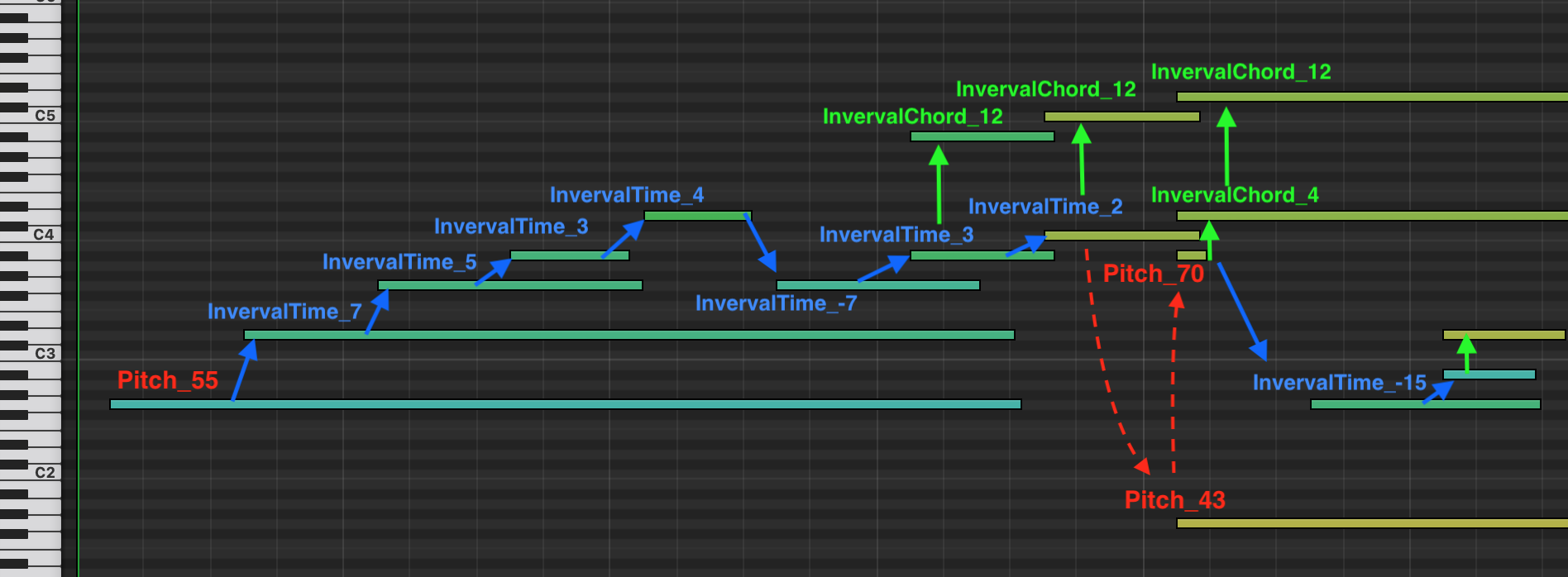
PitchBendtokens. In multitrack setting, aProgramtoken will be added before eachPitchBend` token. (default: ``False)use_pitch_intervals – if given True, will represent the pitch of the notes with pitch intervals tokens. This way, successive and simultaneous notes will be represented with respectively
PitchIntervalTimeandPitchIntervalChordtokens. A good example is depicted in Additional tokens. This option is to be used with themax_pitch_intervalandpitch_intervals_max_time_distarguments. (default: False)use_programs – will use
Programtokens to specify the instrument/MIDI program of the notes, if the tokenizer is compatible (TSD, REMI, MIDI-Like, Structured and CPWord). Use this parameter with theprograms,one_token_stream_for_programsand program_changes arguments. By default, it will prepend aProgramtokens before eachPitch/NoteOntoken to indicate its associated instrument, and will treat all the tracks of a MIDI as a single sequence of tokens. CPWord, Octuple and MuMIDI add aProgramtokens with the stacks ofPitch,VelocityandDurationtokens. The Octuple, MMM and MuMIDI tokenizers use nativelyProgramtokens, this option is always enabled. (default:False)beat_res_rest – the beat resolution of
Resttokens. It follows the same data pattern as thebeat_resargument, however the maximum resolution for rests cannot be higher than the highest “global” resolution (beat_res). Rests are considered complementary to other time tokens (TimeShift,BarandPosition). If in a given situation,Resttokens cannot represent time with the exact precision, other time times will complement them. (default:{(0, 1): 8, (1, 2): 4, (2, 12): 2})chord_maps – list of chord maps, to be given as a dictionary where keys are chord qualities (e.g. “maj”) and values pitch maps as tuples of integers (e.g.
(0, 4, 7)). You can usemiditok.constants.CHORD_MAPSas an example. (default:miditok.constants.CHORD_MAPS)chord_tokens_with_root_note – to specify the root note of each chord in
Chordtokens. Tokens will look likeChord_C:maj. (default:False)chord_unknown – range of number of notes to represent unknown chords. If you want to represent chords that does not match any combination in
chord_maps, use this argument. LeaveNoneto not represent unknown chords. (default:None)num_tempos – number of tempos “bins” to use. (default:
32)tempo_range – range of minimum and maximum tempos within which the bins fall. (default:
(40, 250))log_tempos – will use log scaled tempo values instead of linearly scaled. (default:
False)remove_duplicated_notes – will remove duplicated notes before tokenizing MIDIs. Notes with the same onset time and pitch value will be deduplicated. This option will slightly increase the tokenization time. This option will add an extra note sorting step in the MIDI preprocessing, which can increase the overall tokenization time. (default:
False)delete_equal_successive_tempo_changes – setting this option True will delete identical successive tempo changes when preprocessing a MIDI file after loading it. For examples, if a MIDI has two tempo changes for tempo 120 at tick 1000 and the next one is for tempo 121 at tick 1200, during preprocessing the tempo values are likely to be downsampled and become identical (120 or 121). If that’s the case, the second tempo change will be deleted and not tokenized. This parameter doesn’t apply for tokenizations that natively inject the tempo information at recurrent timings (e.g. Octuple). For others, note that setting it True might reduce the number of
Tempotokens and in turn the recurrence of this information. Leave it False if you want to have recurrentTempotokens, that you might inject yourself by addingTempoChangeobjects to your MIDIs. (default:False)time_signature_range – range as a dictionary
{denom_i: [num_i1, ..., num_in]/(min_num_i, max_num_i)}. (default:{8: [3, 12, 6], 4: [5, 6, 3, 2, 1, 4]})sustain_pedal_duration – by default, the tokenizer will use
PedalOfftokens to mark the offset times of pedals. By setting this parameter True, it will instead useDurationtokens to explicitly express their durations. If you use this parameter, make sure to configurebeat_resto cover the durations you expect. (default:False)pitch_bend_range – range of the pitch bend to consider, to be given as a tuple with the form
(lowest_value, highest_value, num_of_values). There will benum_of_valuestokens equally spaced betweenlowest_value` and `highest_value. (default:(-8192, 8191, 32))delete_equal_successive_time_sig_changes – setting this option True will delete identical successive time signature changes when preprocessing a MIDI file after loading it. For examples, if a MIDI has two time signature changes for 4/4 at tick 1000 and the next one is also 4/4 at tick 1200, the second time signature change will be deleted and not tokenized. This parameter doesn’t apply for tokenizations that natively inject the time signature information at recurrent timings (e.g. Octuple). For others, note that setting it
Truemight reduce the number ofTimeSigtokens and in turn the recurrence of this information. Leave itFalseif you want to have recurrentTimeSigtokens, that you might inject yourself by addingTimeSignatureChangeobjects to your MIDIs. (default:False)programs – sequence of MIDI programs to use. Note that
-1is used and reserved for drums tracks. (default:list(range(-1, 128)), from -1 to 127 included)one_token_stream_for_programs – when using programs (
use_programs), this parameters will make the tokenizer treat all the tracks of a MIDI as a single stream of tokens. AProgramtoken will prepend eachPitch,NoteOnandNoteOfftokens to indicate their associated program / instrument. Note that this parameter is always set to True for MuMIDI and MMM. Setting it to False will make the tokenizer not usePrograms, but will allow to still haveProgramtokens in the vocabulary. (default:True)program_changes – to be used with
use_programs. If given True, the tokenizer will placeProgramtokens whenever a note is being played by an instrument different from the last one. This mimics the ProgramChange MIDI messages. If given False, aProgramtoken will precede each note tokens instead. This parameter only apply for REMI, TSD and MIDI-Like. If you set it True while your tokenizer is not intone_token_streammode, aProgramtoken at the beginning of each track token sequence. (default:False)max_pitch_interval – sets the maximum pitch interval that can be represented. (default:
16)pitch_intervals_max_time_dist – sets the default maximum time interval in beats between two consecutive notes to be represented with pitch intervals. (default:
1)kwargs – additional parameters that will be saved in
config.additional_params.
- classmethod from_dict(input_dict: dict[str, Any], **kwargs) TokenizerConfig
Instantiate an
TokenizerConfigfrom a Python dictionary.- Parameters:
input_dict – Dictionary that will be used to instantiate the configuration object.
kwargs – Additional parameters from which to initialize the configuration object.
- Returns:
The
TokenizerConfigobject instantiated from those parameters.
- classmethod load_from_json(config_file_path: str | Path) TokenizerConfig
Load a tokenizer configuration from the config_path path.
- Parameters:
config_file_path – path to the configuration JSON file to load.
- property max_num_pos_per_beat: int
Returns the maximum number of positions per ticks covered by the config.
- Returns:
maximum number of positions per ticks covered by the config.
- save_to_json(out_path: str | Path) None
Save a tokenizer configuration object to the out_path path.
- Parameters:
out_path – path to the output configuration JSON file.
- to_dict(serialize: bool = False) dict[str, Any]
Serialize this configuration to a Python dictionary.
- Parameters:
serialize – will serialize the dictionary before returning it, so it can be saved to a JSON file.
- Returns:
Dictionary of all the attributes that make up this configuration instance.
Additional tokens
MidiTok offers to include additional tokens on music information. You can specify them in the tokenizer_config argument (miditok.TokenizerConfig) when creating a tokenizer. The miditok.TokenizerConfig documentations specifically details the role of each of them, and their associated parameters.
Tokenization |
Tempo |
Time signature |
Chord |
Rest |
Sustain pedal |
Pitch bend |
Pitch interval |
|---|---|---|---|---|---|---|---|
MIDILike |
✅ |
✅ |
✅ |
✅ |
✅ |
✅ |
✅ |
REMI |
✅ |
✅ |
✅ |
✅ |
✅ |
✅ |
✅ |
TSD |
✅ |
✅ |
✅ |
✅ |
✅ |
✅ |
✅ |
Structured |
❌ |
❌ |
❌ |
❌ |
❌ |
❌ |
❌ |
CPWord |
✅ |
✅¹ |
✅ |
✅¹ |
❌ |
❌ |
❌ |
Octuple |
✅ |
✅² |
❌ |
❌ |
❌ |
❌ |
❌ |
MuMIDI |
✅ |
❌ |
✅ |
❌ |
❌ |
❌ |
❌ |
MMM |
✅ |
✅ |
✅ |
❌ |
❌ |
❌ |
✅ |
¹: using both time signatures and rests with miditok.CPWord might result in time alterations, as the time signature changes are carried with the Bar tokens which can be skipped during period of rests.
²: using time signatures with miditok.Octuple might result in time alterations, as the time signature changes are carried with the note onsets. An example is shown below.
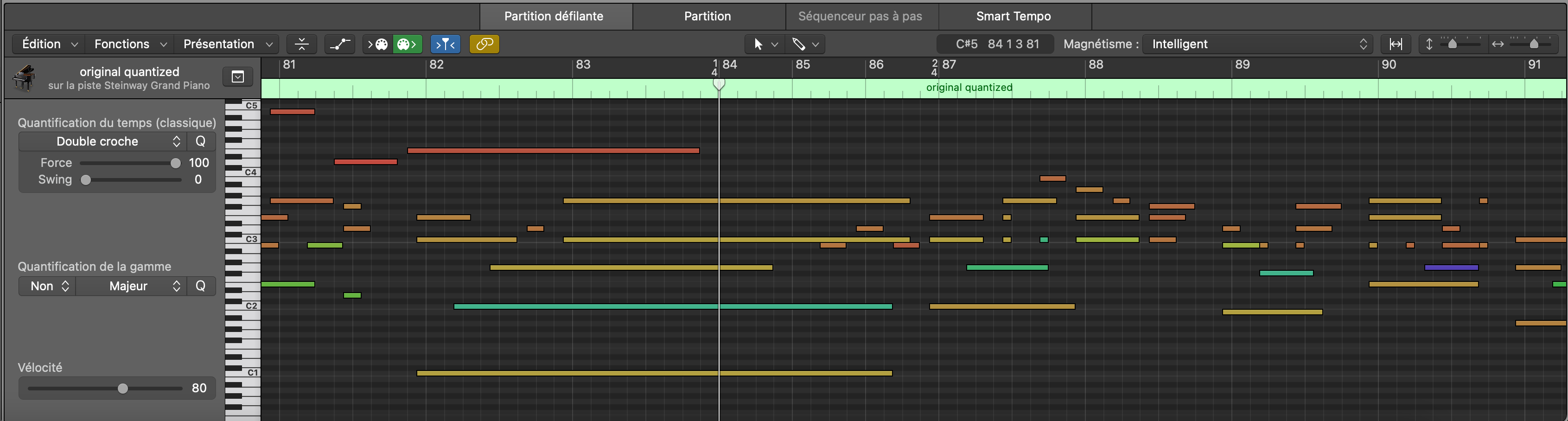
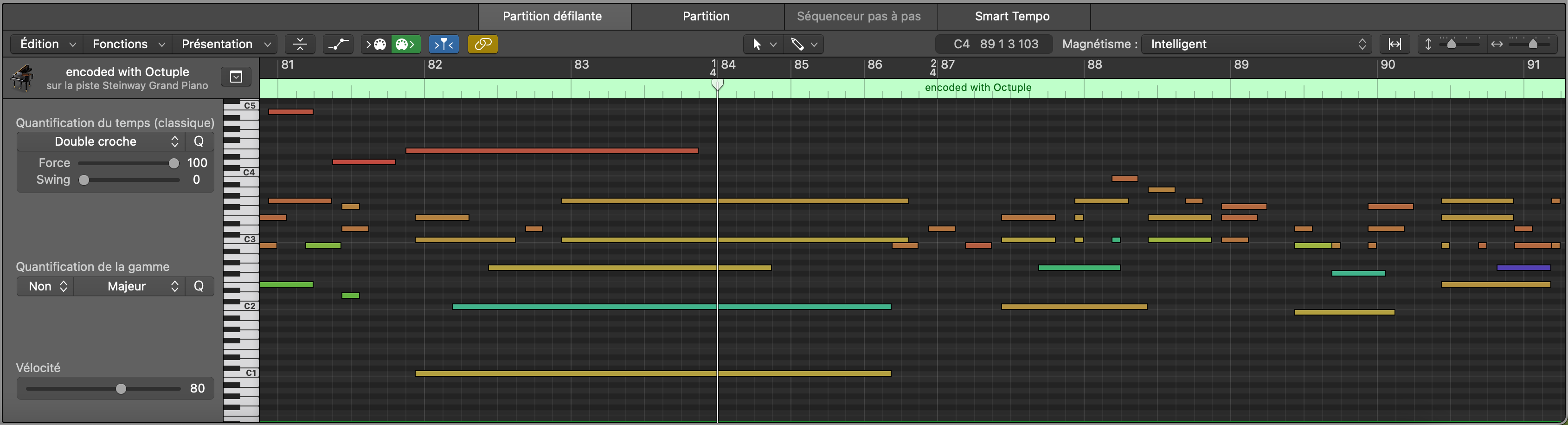
Below is an example of how pitch intervals would be tokenized, with a max_pitch_interval of 15.
Special tokens
MidiTok offers to include some special tokens to the vocabulary. These tokens with no “musical” information can be used for training purposes.
To use special tokens, you must specify them with the special_tokens argument when creating a tokenizer. By default, this argument is set to ["PAD", "BOS", "EOS", "MASK"]. Their signification are:
PAD (
PAD_None): a padding token to use when training a model with batches of sequences of unequal lengths. The padding token id is often set to 0. If you use Hugging Face models, be sure to pad inputs with this tokens, and pad labels with -100.BOS (
SOS_None): “Start Of Sequence” token, indicating that a token sequence is beginning.EOS (
EOS_None): “End Of Sequence” tokens, indicating that a token sequence is ending. For autoregressive generation, this token can be used to stop it.MASK (
MASK_None): a masking token, to use when pre-training a (bidirectional) model with a self-supervised objective like BERT.
Note: you can use the tokenizer.special_tokens property to get the list of the special tokens of a tokenizer, and tokenizer.special_tokens for their ids.
Tokens & TokSequence input / output format
Depending on the tokenizer at use, the format of the tokens returned by the :py:func:`miditok.MIDITokenizer.midi_to_tokens method may vary, as well as the expected format for the miditok.MIDITokenizer.tokens_to_midi() method. The format is given by the miditok.MIDITokenizer.io_format() property. For any tokenizer, the format is the same for both methods.
The format is deduced from the miditok.MIDITokenizer.is_multi_voc() and one_token_stream tokenizer attributes. one_token_stream being True means that the tokenizer will convert a MIDI file into a single stream of tokens for all instrument tracks, otherwise it will convert each track to a distinct token sequence. miditok.MIDITokenizer.is_multi_voc() being True means that each token stream is a list of lists of tokens, of shape (T,C) for T time steps and C subtokens per time step.
This results in four situations, where I is the number of tracks, T is the number of tokens (or time steps) and C the number of subtokens per time step:
is_multi_vocandone_token_streamare bothFalse:[I,(T)];is_multi_vocisFalseandone_token_streamisTrue:(T);is_multi_vocisTrueandone_token_streamisFalse:[I,(T,C)];is_multi_vocandone_token_streamare bothTrue:(T,C).
Note that if there is no I dimension in the format, the output of midi_to_tokens is a miditok.TokSequence object, otherwise it is a list of miditok.TokSequence objects (one per token stream / track).
Some tokenizer examples to illustrate:
TSD without
config.use_programswill not have multiple vocabularies and will treat each MIDI track as a unique stream of tokens, hence it will convert MIDI files to a list ofmiditok.TokSequenceobjects,(I,T)format.TSD with
config.use_programsbeing True will convert all MIDI tracks to a single stream of tokens, hence onemiditok.TokSequenceobject,(T)format.CPWord is a multi-voc tokenizer, without
config.use_programsit will treat each MIDI track as a distinct stream of tokens, hence it will convert MIDI files to a list ofmiditok.TokSequenceobjects with the(I,T,C)format.Octuple is a multi-voc tokenizer and converts all MIDI track to a single stream of tokens, hence it will convert MIDI files to a
miditok.TokSequenceobject,(T,C)format.
Magic methods
Magic methods allows to intuitively access to a tokenizer’s attributes and methods. We list them here with some examples.
- miditok.MIDITokenizer.__call__(self, obj: Score | TokSequence | list[TokSequence, int, list[int]], *args, **kwargs) TokSequence | list[TokSequence] | Score
Tokenize a MIDI file, or decode tokens into a MIDI.
Calling a tokenizer allows to directly convert a MIDI to tokens or vice-versa. The method automatically detects MIDI and token objects, as well as paths and can directly load MIDI or token json files before converting them. This will call the
miditok.MIDITokenizer.midi_to_tokens()if you provide a MIDI object or path to a MIDI file, or themiditok.MIDITokenizer.tokens_to_midi()method otherwise.- Parameters:
obj – a symusic.Score object, a sequence of tokens, or a path to a MIDI or tokens json file.
- Returns:
the converted object.
tokens = tokenizer(midi)
midi2 = tokenizer(tokens)
- miditok.MIDITokenizer.__getitem__(self, item: int | str | tuple[int, int | str]) str | int | list[int]
Convert a token (int) to an event (str), or vice-versa.
- Parameters:
item – a token (int) or an event (str). For tokenizers with embedding pooling/multiple vocabularies ( tokenizer.is_multi_voc ), you must either provide a string (token) that is within all vocabularies (e.g. special tokens), or a tuple where the first element in the index of the vocabulary and the second the element to index.
- Returns:
the converted object.
pad_token = tokenizer["PAD_None"]
- miditok.MIDITokenizer.__len__(self) int
Return the length of the vocabulary.
If the tokenizer uses embedding pooling/have multiple vocabularies, it will return the sum of their lengths. If the vocabulary was learned with fast BPE, it will return the length of the BPE vocabulary, i.e. the proper number of possible token ids. Otherwise, it will return the length of the base vocabulary. Use the
miditok.MIDITokenizer.len()property (tokenizer.len) to get the list of lengths.- Returns:
length of the vocabulary.
num_classes = len(tokenizer)
num_classes_per_vocab = tokenizer.len  # applicable to tokenizer with embedding pooling, e.g. CPWord or Octuple
- miditok.MIDITokenizer.__eq__(self, other: MIDITokenizer) bool
Check that two tokenizers are identical.
This is done by comparing their vocabularies, and configuration.
- Parameters:
other – tokenizer to compare.
- Returns:
True if the vocabulary(ies) are identical, False otherwise.
if tokenizer1 == tokenizer2:
    print("The tokenizers have the same vocabulary and configurations!")
Save / Load tokenizer
You can save and load a tokenizer’s parameters and vocabulary. This is especially useful to track tokenized datasets, and to save tokenizers with vocabularies learned with Byte Pair Encoding (BPE).
- miditok.MIDITokenizer.save_params(self, out_path: str | Path, additional_attributes: dict | None = None, filename: str | None = 'tokenizer.json') None
Save tokenizer in a Json file.
This can be useful to keep track of how a dataset has been tokenized.
- Parameters:
out_path – output path to save the file. This can be either a path to a file (with a name and extension), or a path to a directory in which case the
filenameargument will be used.additional_attributes – any additional information to store in the config file. It can be used to override the default attributes saved in the parent method. (default:
None)filename – name of the file to save, to be used in case
out_pathleads to a directory. (default:"tokenizer.json")
To load a tokenizer from saved parameters, just use the params argument when creating a it:
tokenizer = REMI(params=Path("to", "tokenizer.json"))